
Excellerate Desktop
Prefer church management software that stays on your computer?
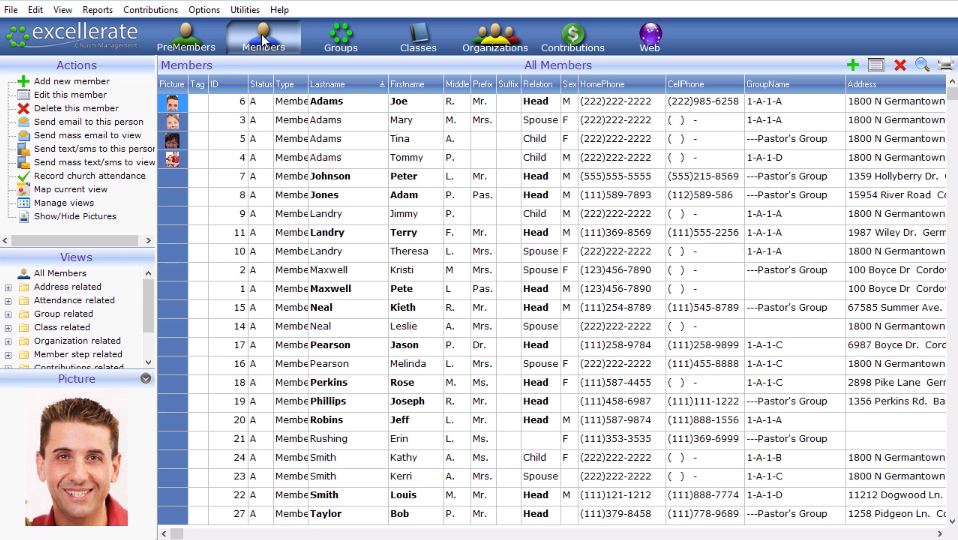
Excellerate Desktop is our traditional Windows church management software, built on more than 27 years of helping churches manage people, groups, attendance, giving, follow-up, check-in, and more.
For churches that prefer to keep their software and data on their own computers, Excellerate Desktop remains a practical option.
EXCELLERATE DESKTOP FEATURES
The church management tools you rely on.
Excellerate Desktop includes the core tools churches need to manage people, ministries, attendance, giving, communication, and follow-up from a Windows PC.
People & Families
Track member and family information, involvement, follow-up, spiritual gifts, skills, and more.
Groups, Classes & Teams
Manage ministry groups, leaders, membership, attendance, classes, teams, and other areas of involvement.
Attendance & Check-In
Track attendance for services and ministries, with optional child check-in and label printing.
Giving & Pledges
Record contributions and pledges, create statements, and maintain complete giving histories.
Email, Lists & Directories
Communicate with selected people and quickly create directories, lists, labels, and mailings.
Reporting
Create detailed reports and use Excellerate’s flexible report designer when your church needs something more specific.
DESKTOP OR CLOUD?
Choose the version that fits how your church works.
Both Excellerate Desktop and Atom provide strong church management tools. The biggest difference is how your team accesses and manages the software.
For most churches choosing a new system today, we recommend Atom because it better fits the way church staff and volunteers increasingly work — from different places, devices, and locations.
Excellerate Desktop
- Windows-based software installed locally
- Best for churches that primarily work from one location
- Your church manages the computer or server and local backups
- Traditional software licensing and support
RECOMMENDED FOR MOST CHURCHES
Atom
- Access from office, home, Mac, PC, tablet, or phone
- Multiple users can work together from different locations
- No local server, software installation, or local backup to maintain
- Better email and texting
- Member portal and leader access
- Automations and dashboards
- Easier remote and multi-location work
If your staff or volunteers need access from different places or devices, Atom is usually the better fit.
ALREADY USING EXCELLERATE DESKTOP?
Moving to Atom is easier than you might think.
Your existing Excellerate data can move directly into Atom, so you can keep the information you’ve spent years building without starting over.
We can usually import your data the same day and give you a private Atom account to explore before you make any changes to your current Desktop system.
Keep your existing data
Members, families, attendance, giving, groups, classes, follow-up, and other Excellerate information can move with you.
Try Atom before changing anything
We can create a private Atom account using a copy of your current data while your Desktop system continues working normally.
Move when you’re ready
Explore Atom at your own pace and decide whether the benefits of cloud access make sense for your church.
See if Atom is a good fit for your church.
Take a quick tour, explore Atom for yourself, or get in touch and tell us what your church needs.
No sales pressure. Just a chance to see whether Atom works the way your church needs it to.